Last Modified on October 31, 2025 by Dr. Tyler Meier
The Best Sitting Position for Lower Back Pain: A Complete Newport Beach Chiropractor Guide

Finding the best sitting position for lower back pain isn’t about one magic posture – it’s about understanding your spine’s needs and making smart adjustments throughout your day. Whether you work at a desk, drive for hours, or spend evenings gaming, proper sitting posture can mean the difference between chronic pain and comfortable living.
Let’s dive into the science-backed strategies that actually work.
Understanding Lower Back Pain
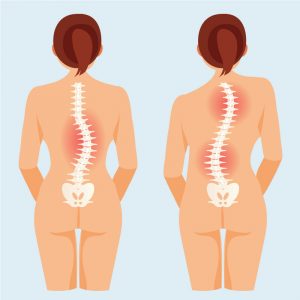
Lower back pain comes in two primary forms: mechanical and structural. Mechanical pain results from how you move and position your body – sitting poorly falls squarely in this category. Structural pain involves actual changes to your spine’s alignment, often developing over months or years of poor habits.
Here’s what typically causes the discomfort:
- Poor posture that compresses spinal discs
- Spinal misalignment from prolonged improper positioning
- Weak core muscles unable to support your spine
- Extended sitting without movement breaks
How Sitting Impacts Your Spine
The Biomechanics of Sitting
When you sit, especially poorly, gravity compresses your lumbar discs and ligaments. Think of your spinal discs as jelly donuts – sitting squashes them, pushing the “jelly” toward the back where your nerves live.
This compression doesn’t just feel uncomfortable. It reduces nutrient flow to your discs, accelerates degeneration, and irritates nerve roots. Over time, this creates the perfect storm for chronic pain.
Loss of Natural Spinal Curves
Your spine naturally curves in an S-shape – lordosis in your neck and lower back, kyphosis in your mid-back. These curves distribute weight efficiently and protect against injury.
Poor sitting flattens or reverses your lumbar lordosis, forcing your spine into unnatural positions. Muscles work overtime to compensate, ligaments stretch beyond their normal range, and joints bear uneven loads.
The Best Sitting Position for Lower Back Pain: Step-by-Step Setup
Let’s get practical. Here’s how to set up the ergonomic sitting position that protects your spine:
Proper Sitting Posture for Back Pain
- Feet Position: Place both feet flat on the floor, hip-width apart. If your feet don’t reach, use a small footrest. This grounds your pelvis and prevents lower body tension.
- Hip and Knee Alignment: Keep your hips slightly higher than your knees – about a 100-110 degree angle. This maintains your lumbar curve naturally without forcing it.
- Lumbar Support: Use an ergonomic cushion or CBP-approved lumbar roll to support your lower back’s natural inward curve. Position it at belt level, filling the gap between your spine and the chair.
- Upper Body Alignment:
-
- Relax your shoulders – they shouldn’t hunch toward your ears
- Align your ears over your shoulders, not forward
- Position your monitor at eye level so you’re not looking down
- Keep your keyboard and mouse within easy reach to avoid stretching
- Core Engagement: Lightly engage your core muscles. You’re not doing crunches, just activating enough support to prevent collapsing forward. Think “tall spine” rather than “tight abs.”
See more: Does Back Pain Lead to Health Issues? Newport Beach Chiropractor
Dynamic Sitting and Movement
Here’s a truth bomb: the best sitting position for lower back pain changes throughout the day. Static postures, even “perfect” ones, eventually cause stiffness.
We recommend micro-movements every 10-15 minutes:
- Shift your weight from one sit bone to the other
- Perform gentle seated twists
- Do shoulder rolls and neck stretches
- Stand and walk for 2-3 minutes every 30-45 minutes
Standing Desk Guidelines: When standing, maintain the same spinal alignment principles. Keep one foot slightly elevated on a footrest, alternating every 20 minutes. Don’t lock your knees – stay slightly soft and mobile.
Recommended Ergonomic Aids
Not all ergonomic products deliver on their promises. At CorePosture Chiropractic, we recommend:
- Lumbar cushions: Look for firm support that maintains your curve without being bulky
- Seat wedges: These tilt your pelvis forward slightly, naturally preserving lumbar lordosis
- Adjustable chairs: Invest in chairs with independent adjustments for seat height, depth, and lumbar support
- Sit-stand desks: Alternate positions throughout your day for optimal spinal health
CBP-approved ergonomic tools complement our structural correction therapy, helping you maintain improvements between adjustments.
The Worst Sitting Positions to Avoid
- The Slouch: Rounding your shoulders and upper back collapses your chest, flattens your lumbar curve, and puts enormous pressure on your discs. This is public enemy number one for spine health.
- The Cross-Legged Twist: Sitting cross-legged or with one leg tucked under you creates asymmetrical pelvic positioning. This twists your sacrum and lumbar spine, leading to uneven muscle development and joint stress.
- The Side Lean: Leaning consistently to one side while working on laptops or checking phones creates chronic imbalances. Your muscles adapt to this asymmetry, pulling your spine out of alignment.
- The Couch Potato: Soft couches and deep recliners feel comfortable initially but destroy spinal alignment. They encourage slouching and provide zero lumbar support, accelerating disc degeneration.
Setting Up a Spine-Friendly Workspace
Let’s build your ideal ergonomic workstation step-by-step:
Chair Setup
- Adjust seat height so feet rest flat with thighs parallel to the floor
- Set seat depth allowing 2-3 inches between seat edge and back of your knees
- Position lumbar support at your natural curve
- Adjust armrests so shoulders stay relaxed
Monitor Alignment: Place your screen 20-26 inches from your eyes. The top third of the screen should sit at eye level. Use a monitor riser or stack of books if needed.
Keyboard and Mouse Positioning: Keep both within easy reach, allowing your elbows to rest at 90 degrees with relaxed shoulders. Your wrists should remain neutral, not bent upward or downward.
Additional Ergonomic Elements:
- Use wrist rests to maintain neutral wrist position
- Consider an anti-fatigue mat if using a standing desk
- Keep frequently used items within the “comfort zone” – 18 inches around you
Active Workspace Habits: Set reminders for movement breaks. We recommend simple stretches between work sessions:
- Standing hip flexor stretches
- Doorway chest openers
- Cat-cow spinal movements
- Gentle neck rotations
How Chiropractic BioPhysics Helps
Prolonged poor sitting doesn’t just cause temporary discomfort – it creates lasting structural changes. Your body adapts to the positions you maintain most frequently, gradually shifting your spine away from its ideal alignment.
As a chiropractor Newport Beach patients trust for structural correction, we see these adaptations daily. Forward head posture, flattened lumbar curves, and rotated pelvises become your body’s “new normal”.
The CBP Method
Chiropractic BioPhysics goes beyond symptom relief. We focus on restoring your spine’s ideal curvature and balance through:
- Mirror-Image Adjustments: We apply precise forces in the opposite direction of your misalignment, gradually training your spine back toward its optimal position.
- Spinal Traction: Customized traction protocols stretch and reshape your spinal curves over time, reversing the damage from prolonged poor posture.
- Postural Rehabilitation: Specific exercises strengthen the muscles needed to maintain proper alignment, ensuring improvements last beyond our office visits.
Take Action for Your Spinal Health
The best sitting position for lower back pain combines awareness, proper setup, and movement throughout your day. Remember: posture awareness + regular movement + structural alignment = long-term spinal health.
Ready to go beyond managing symptoms and actually correct your spinal structure? Book a Chiropractic BioPhysics consultation at CorePosture Chiropractic to receive a comprehensive postural assessment and customized correction plan designed specifically for your needs.
Your journey to a pain-free life starts with understanding your spine and we’re here to guide you every step of the way.

Dr. Tyler Meier is a board-certified, licensed chiropractor and founder of CorePosture Chiropractic in Newport Beach, CA